When you first look at a product like PaperShow for Teachers you immediately see the value proposition for teachers using it with their students in the classroom. But often you may overlook all the other ways that PaperShow for Teachers can be used in the school building. When you get down to it there are lots of great ways that athletic coaches can take advantage of PaperShow for Teachers as they work with their teams on plays and strategy. In this example a football coach could using PaperShow for Teachers show his players how to run the following play when his team is near the goal line. Imagine for a moment that you are the football coach, just how powerful PaperShow for Teachers could be as part of teaching players how to run various plays.
To create the gridiron within PaperShow for Teachers you can simply go to this website and download the gridiron PDF. Once you have downloaded the PDF file you can import it directly into PaperShow for Teachers and then print it on the PaperShow for Teachers interactive paper with a color printer. From there you can now simply write on the page and everyone can see the results. PaperShow for Teachers is a powerful tool for all kinds of athletic coaches- the uses of PaperShow for Teachers is mind boggling. So enjoy!
Showing posts with label papershow. Show all posts
Sunday, December 12, 2010
Friday, November 19, 2010
PaperShow for Teachers Webinar
Join me on Monday November 29th at 10 am EST for a free demonstration of PaperShow for Teachers.Find out how this innovative presentation tool can be used in the classroom, boardroom, or for webinars. Click here 
to sign up.PaperShow for Teachers is a cost effective tool to spice up lessons, presentations and webinars. Learn how you can use PaperShow for Teachers for brainstorming sessions or for capturing ideas in the classroom. Once you have captured the information you can easily share it as a PDF file. PaperShow for Teachers also lets you annotate images or your PowerPoint slides to make for richer and more engaging presentations. So sign up for this free webinar and learn about the power of this cost effect presentation tool. Click here
to sign up. Once you sign up you will receive a link for the webinar. Hope to see you there! Brian
Labels:
papershow,
PaperShow for Teachers,
powerpoint,
presentations
Tuesday, September 14, 2010
Doing a Quick PaperShow Webinar
With the right tools it is easy to quickly do an impromptu webinar with good results. Today I had a chance to do a screensharing session with my friend and colleague Karen JanowskKaren and I have been using Skype
Labels:
brian friedlander,
canson,
papershow,
PaperShow for Teachers
Tuesday, September 7, 2010
Importing a List of Images into PaperShow for Teachers
For the past year I have used PaperShow
extensively in my teaching and when I am doing workshops and presentations. I have primarily used PaperShow as a digital flipchart which has really worked out really well. Recently, I have begun to use PaperShow when teaching my graduate course in Action Research to make my PowerPoint presentations more interactive and engaging which has put a whole new spin on how I am using this innovative and exciting product. Having said this, there may be times in the classroom or in your training session that all you want to do is to be able to show and annotate images and don't really have the need for a full blown PowerPoint presentation. So the question is- is there a way for me to bring in just a list of images that I can then show and annotate? Of course the answer is a resounding yes! In fact you can import jpg, gif, and png files into the PaperShow application and then print them on the 8 1/2 x 11 PaperShow paper so that you can annotate on top of them. If you plan on importing a series of images I would recommend that you place all of the images that you want to use in a folder which will make it easier to import as you will see in the video below. So go ahead and feel free to use PaperShow just with a list of images. This technique works equally well on the Mac and on a PC.
Labels:
brian friedlander,
canson,
papershow,
PaperShow for Teachers
Wednesday, September 1, 2010
Getting Started with PaperShow for Teachers
Congratulations on your purchase of PaperShow Now it is time to get you up and running so that you can use it effectively in the classroom. With PaperShow for Teachers it is easy to make your notes and lectures come to life with color, images, audio and video. In this blog I will explore different ways you can use PaperShow for Teachers in the classroom and provide you with some tips and tricks.So lets get started!If you haven't done so already, open the battery compartment of the digital pen and insert the supplied battery. Replace the cover of the pen. Now insert the USB key into any USB port on your computer to launch the PaperShow for Teachers application. If you are on a Macintosh you will have to follow the onscreen direction and enter a code when prompted for the Bluetooth pairing. On a Windows computer the PaperShow for Teachers app should open and you will be prompted to take the cap off of the pen so that it can be paired. Once that is complete you can click on Open a New Whiteboard and you are ready to go. Touch the pen to the paper and you are ready to use all of the tools on the paper.
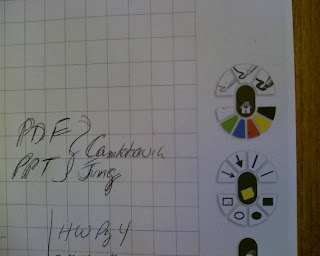
On the Right hand side of the paper you will find all of your controls to change the pen tip width and color. You can also add lines, squares, triangles, circles and filled in shapes with PaperShow for Teachers. When you are through using PaperShow for Teachers simply save what you were working on to the key so that you can revisit the information on another day or you can Export the contents as a PDF file. More about these features in another blog post. So explore the toolkit and let me know what you think.
PaperShow for Teachers is available from AssistiveTek, LLC. For information about purchasing and training contact me.
Labels:
assistivetek,
papershow,
PaperShow for Teachers
Subscribe to:
Posts (Atom)
